


 MEJOR
MEJOR
PUBG Mobile Top-Up
Acerca de PUBG Mobile Top-Up
PUBG Mobile UC Top-Up
Purchase PUBG Mobile UC and enjoy in-game features such as Lucky Spin and Season Pass! PUBG UCs are credited directly to your account upon purchase.
About PUBG Mobile UC
PlayerUnknown Battleground (PUBG) Mobile is an original battle royale style game. You can create your own character and join a free-for-all battle online with a team or go solo on the battlefield. In-game purchases such as crate box unlocks weapon skins, clothes, parachutes and many more items!
A gaming industry giant by Tencent Games, PUBG is single-handedly responsible for the massive popularity of the entire Battle Royale genre. In 2018, Tencent Games released the PUBG Corporation game for mobile devices on Android and iOS systems.
Players can download the game completely free of charge. However, to make the most of your gaming experience on PUBG, you should buy the PUBG Mobile UC Top Up code!
Buy now on GRZGAMING!
How to top-up PUBG Mobile UC?
- Select the Unknown Cash UC denomination.
- Enter your PUBG Mobile Player ID.
- Check out and select your payment method.
- Once payment made, the PUBG Mobile UC you purchased will be credited to your PUBG Mobile Account shortly.
Important Information:
- Only Player ID required for PUBG Mobile UC top-up.
- You may stay logged in throughout the transaction, once the top-up is completed, you will receive the UC in your PUBG Mobile account.
- Please enter your Player ID correctly to avoid delay on receiving your UC.
- This service is not available for Japanese / Korean / Taiwan / Vietnam servers.
- Players only entitled to purchase PUBG Mobile Royale Pass Pack and Elite Pass Plus once per season. Once Royale Pass Pack has been activated, players can’t upgrade to Elite Pass Plus.
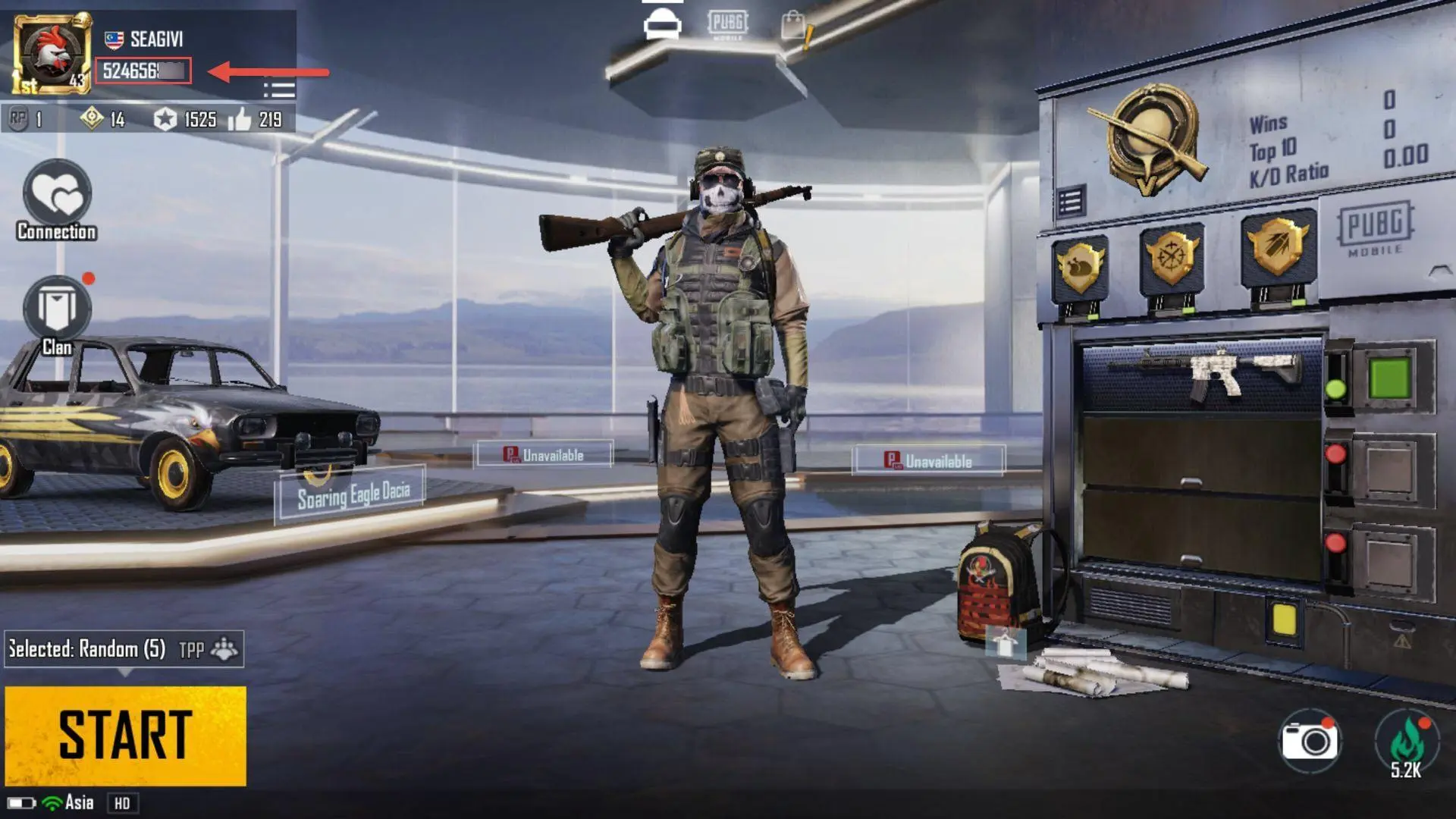
How to find PUBG Mobile Player ID?
- Use your account to log into the game.
- Open your player profile.
- Your PUBG Mobile Player ID will be displayed.
Cómo funciona
Elige tu paquete arriba.
Completa el pago y sigue el pedido desde tu cuenta.
Customer reviews
See all reviews-
Verified purchase
التأخير في معالجة الشحن
Helpful9 found this helpful -
Verified purchase
Will buy again.
Helpful11 found this helpful -
Verified purchase
Will buy again.
Helpful11 found this helpful -
Verified purchase
Smooth checkout. Will buy again
Helpful5 found this helpful -
Verified purchase
Fast delivery.
Smooth checkout.Helpful5 found this helpful -
Verified purchase
Fast delivery.
Helpful6 found this helpful